
Freight File Management
Import · Export · Domestic · All modes from a single unified screen
The operational core of TraLIS. Every file — whether air, sea, road, or customs — is tracked from creation to close. Automatic alerts on incoterms and invoicing eliminate costly oversights. Sub-files, documents, and statuses are accessible in real time by the entire team.
What you can do
Multimodal tracking
Air, sea, road, land, and customs files in a single interface. Each mode has its specific fields without cluttering the interface for others.
Automatic alerts
Alerts on inconsistent incoterms, overdue invoicing deadlines, and approaching shipment milestones. Detect anomalies before they become disputes.
Documents & Loading
Packing list, B/L, AWB, SAD, commercial invoices — all documents are attached to the file and can be generated from TraLIS. Loading is tracked container by container.
Per-file margin analysis
Gross revenue, direct costs, and net margin calculated in real time on every file. Identify unprofitable files before closing.
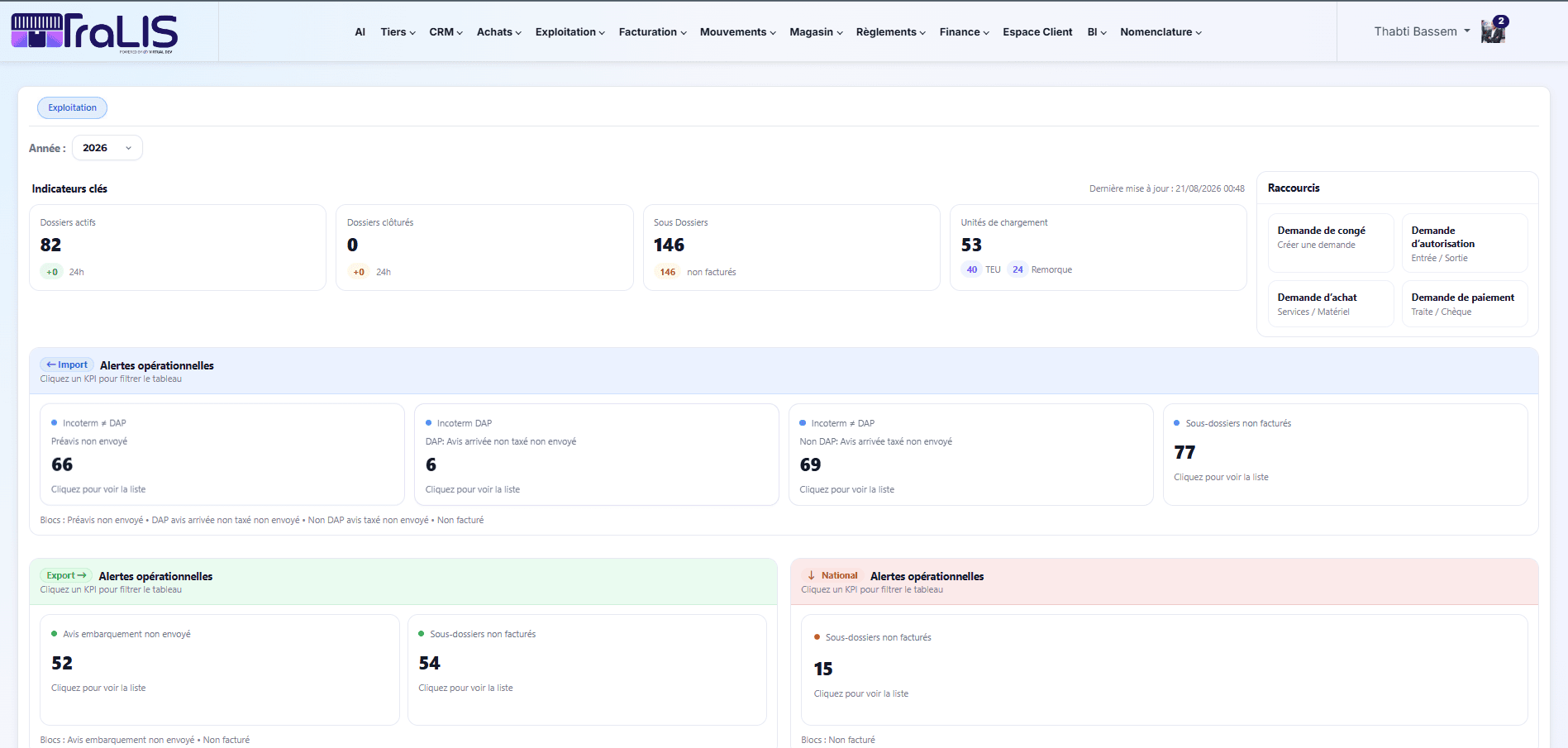
An import maritime file with zero re-entry
A client sends you their transit request. You create the maritime import file in TraLIS, enter the CIF incoterm and vessel details. On arrival, the delivery order is generated automatically, invoicing pulls the file amounts — freight, port charges, fees — and the electronic signature is applied in one click. Zero intermediate Excel exports.
Sectors using this module
Want to see Freight File Management in action?
We prepare a focused demo on this module, in your business context.
Request a demo →